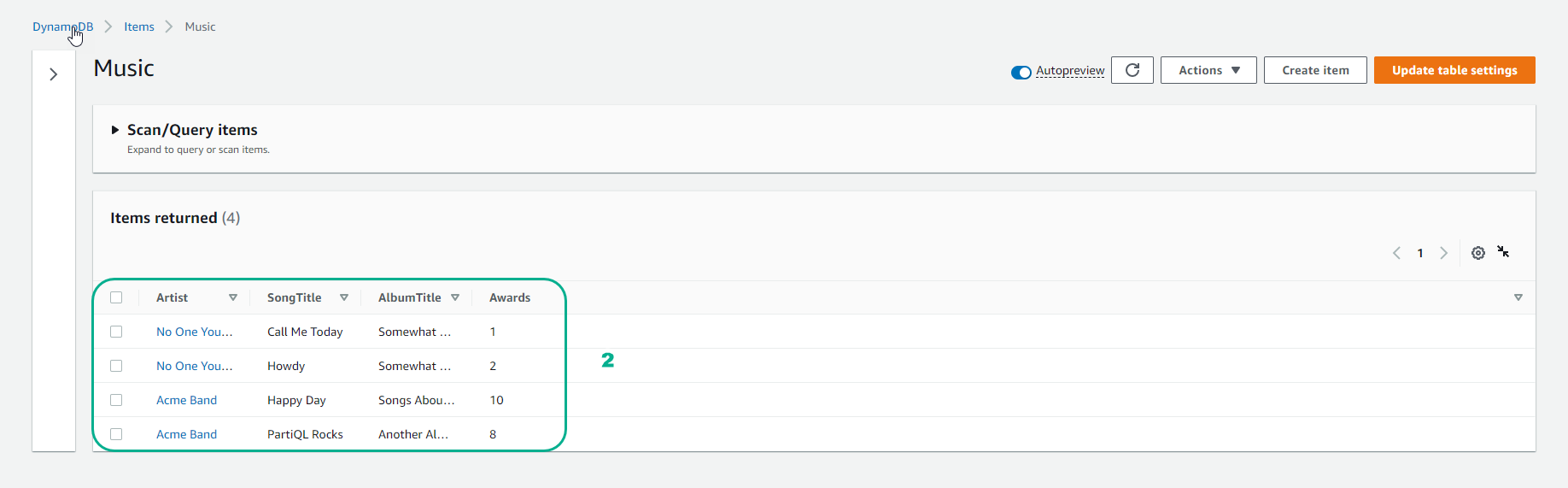
Ghi dữ liệu
- Để ghi dữ liệu, sử dụng lệnh
put-item
- Sau khi tạo table ở bước 2.2.1 Tạo table, tiếp tục gõ lệnh:
aws dynamodb put-item \
    --table-name Music  \
    --item \
        '{"Artist": {"S": "No One You Know"}, "SongTitle": {"S": "Call Me Today"}, "AlbumTitle": {"S": "Somewhat Famous"}, "Awards": {"N": "1"}}'

aws dynamodb put-item \
    --table-name Music  \
    --item \
        '{"Artist": {"S": "No One You Know"}, "SongTitle": {"S": "Howdy"}, "AlbumTitle": {"S": "Somewhat Famous"}, "Awards": {"N": "2"}}'

aws dynamodb put-item \
    --table-name Music \
    --item \
        '{"Artist": {"S": "Acme Band"}, "SongTitle": {"S": "Happy Day"}, "AlbumTitle": {"S": "Songs About Life"}, "Awards": {"N": "10"} }'

aws dynamodb put-item \
    --table-name Music \
    --item \
        '{"Artist": {"S": "Acme Band"}, "SongTitle": {"S": "PartiQL Rocks"}, "AlbumTitle": {"S": "Another Album Title"}, "Awards": {"N": "8"} }'
- Kết quả: